
Introduction (Google Gemini Review)
If you are looking for an AI assistant that can help with writing, research, coding, brainstorming and everyday tasks Gemini from Google is a tool you should think about in 2026.
Is Gemini truly worth using? How good is the free version? What do you get with a paid plan?. How does Gemini compare with ChatGPT and Claude?
In this Gemini review we will explore Geminis features, pricing, writing and coding abilities its integration with Google Workspace, the pros and cons and real‑world examples.
We will also compare Gemini with ChatGPT and Claude to help you decide if Gemini is the AI assistant, for your needs.
Table of Contents
What Is Google Gemini?
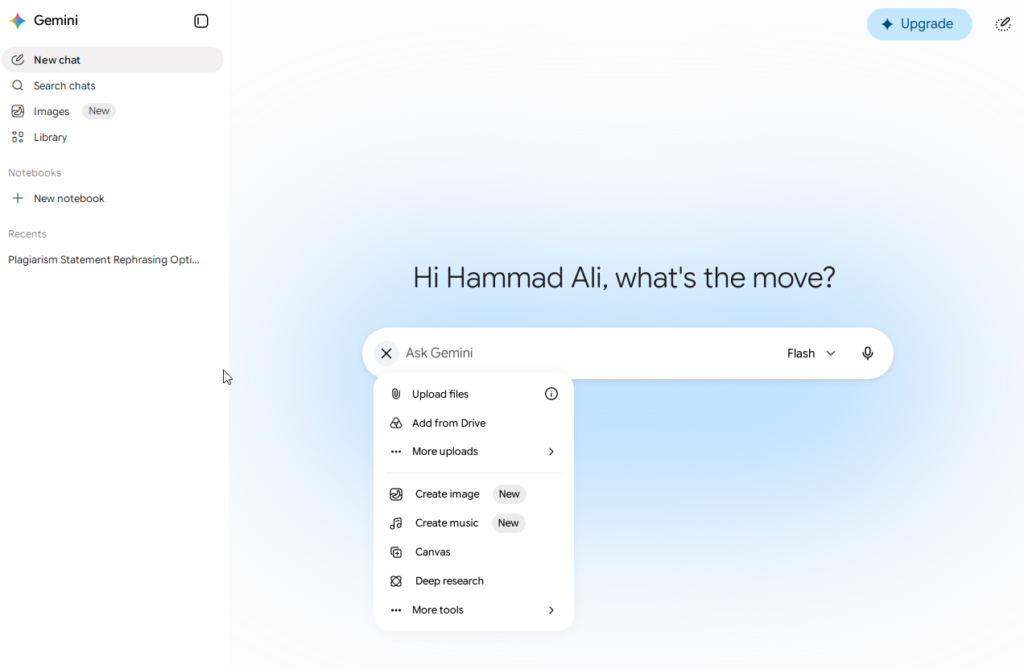
Google Gemini is an AI assistant developed by Google that can help users with tasks such as writing, research, coding, brainstorming, summarization, and document analysis.
Unlike a traditional text-only chatbot, Gemini is designed to work with different types of information, including text, images, documents, and code, depending on the features available to the user.
One of Gemini’s biggest advantages is its connection with Google’s ecosystem. People who already use services such as Gmail, Google Docs, Google Drive, and other Google products may find Gemini particularly convenient.
Google provides free access to Gemini along with paid options for users who need additional capabilities or higher usage limits.
Google Gemini Features
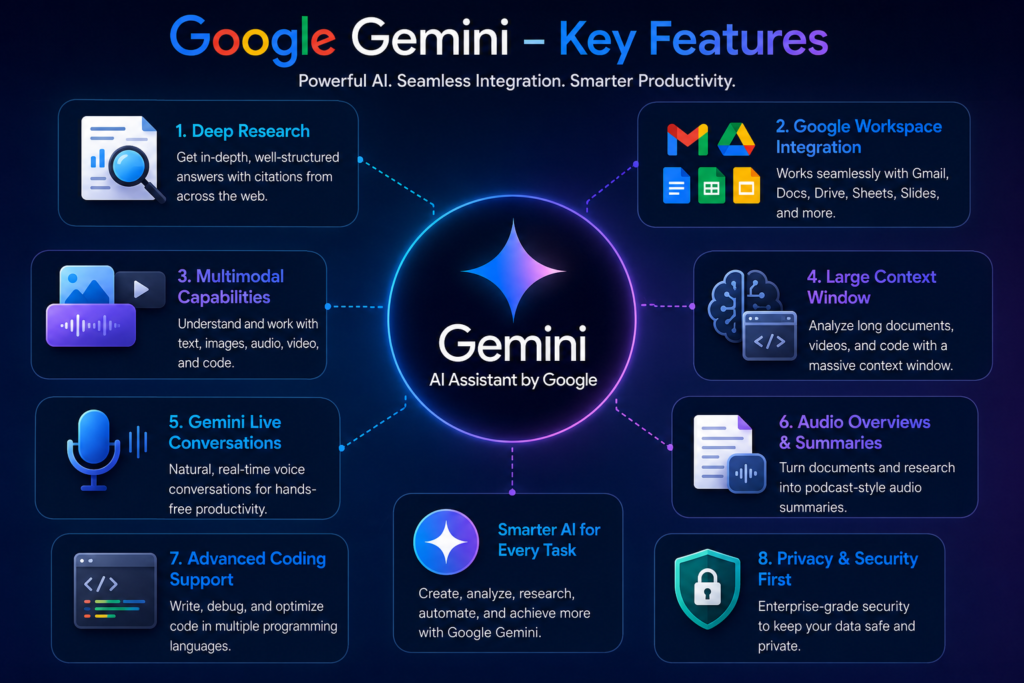
Gemini includes a wide range of features designed for students, professionals, developers, bloggers, and everyday users.

1. Natural AI Conversations
Gemini can understand natural-language prompts and provide responses in a conversational format.
You can use it to:
- Answer questions
- Brainstorm ideas
- Write emails
- Create content outlines
- Explain difficult topics
- Summarize information
- Plan projects
- Rewrite existing text
The conversational interface makes it easy for beginners to start using AI without learning complicated commands.
2. Multimodal AI Capabilities
One of Gemini’s useful capabilities is its ability to work with more than just plain text.
Depending on the available features and plan, Gemini can work with:
- Text
- Images
- Documents
- Code
- Other supported content types
This makes Gemini useful for tasks where users need to combine different types of information.
3. Google Workspace Integration
Google ecosystem integration is one of Gemini’s most important advantages.
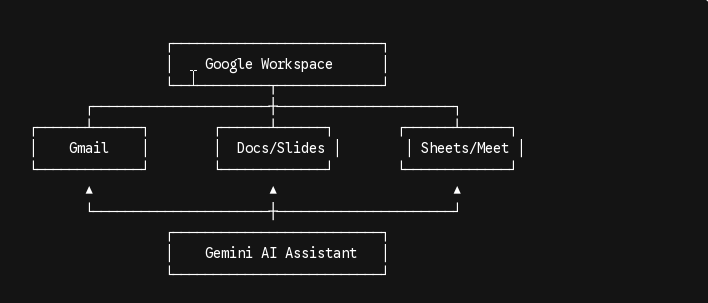
Depending on the available features, Gemini can assist with workflows involving services such as:
For people who already spend most of their workday inside Google products, this can reduce the need to constantly switch between different applications.
4. Document Analysis
Gemini can help users understand and summarize longer documents.
Potential use cases include:
- Research papers
- Business reports
- PDFs
- Study materials
- Meeting notes
- Other documents
Instead of manually searching through a long document, users can ask questions about the content and request summaries or explanations.
As with any AI system, important information should still be checked against the original source.
5. Writing Assistance
Writing is one of the most common reasons people use Gemini.
It can help create:
- Blog outlines
- Articles
- Product descriptions
- Marketing copy
- Emails
- Social media posts
- FAQs
- Reports
Gemini can also rewrite existing content and adjust its tone or structure.
For publishers and bloggers, however, AI-generated content should be reviewed, edited, and fact-checked before publication.
6. Coding Assistance
Gemini can also help developers and people learning programming.
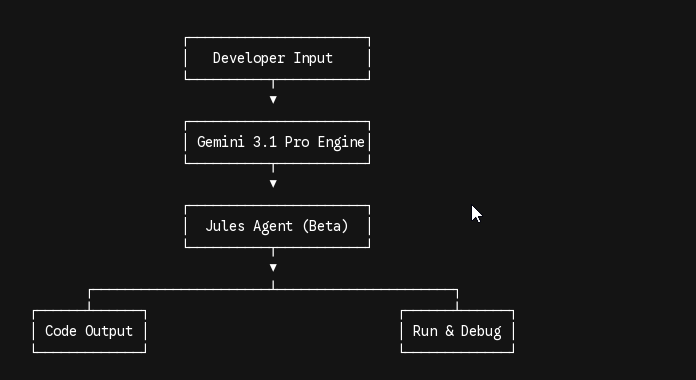
Common uses include:
- Explaining code
- Finding coding errors
- Creating code examples
- Learning programming concepts
- Improving existing code
- Debugging
- Generating documentation
AI-generated code should always be tested before being used in a production project.
7. Research Support
Gemini can be useful when organizing and understanding information.
It can help users:
- Summarize information
- Compare concepts
- Organize research notes
- Explain technical subjects
- Extract important points
- Generate research ideas
This can be particularly useful for students, researchers, bloggers, and professionals.
Who Should Use Google Gemini?
Google Gemini can be useful for many types of users, including:
- Students
- Bloggers
- Content creators
- Developers
- Freelancers
- Researchers
- Digital marketers
- Business professionals
- Small business owners
It is especially appealing to people who already use Google’s ecosystem regularly.
Our First Impression
During our evaluation, Google Gemini delivered a smooth user experience for everyday writing, research, and productivity tasks. Its integration with Google services is particularly useful for users who already work with Gmail, Google Docs, and Google Drive.
While some advanced capabilities depend on the selected plan and feature availability, the free version provides a practical starting point for users who want to explore Google’s AI assistant.
Google Gemini Cost, Pricing and Plans
Google Gemini offers different plans for personal users, businesses, and developers. Personal users can choose between a free option and Google AI Plus, Pro, or Ultra plans, while businesses can choose Gemini Enterprise editions. Developers can use the Gemini Developer API through a no-cost option or pay based on usage.
Pricing, usage limits, available models, and some features can vary by country, plan, platform, and availability.
Personal Gemini Plans
Personal users can access Gemini for free with a Google Account or upgrade to one of Google’s paid AI plans for higher usage limits and additional features.
Gemini Personal Plans — Pricing Comparison
| Plan | Price | Usage Access | Storage | Main Features |
|---|---|---|---|---|
| Gemini Free | $0/month | Free access with varying limits | 15 GB | Gemini app, 3.6 Flash, varying access to 3.1 Pro, image generation and editing, Deep Research, Gemini Live, Canvas, Gems, Google Flow, Gemini Notebook |
| Google AI Plus | $4.99/month | 2× higher usage access than Free | 400 GB | Gemini app, video generation, Daily Brief, Google Flow, Google Search features, Gemini Notebook, Gemini in Gmail and Vids |
| Google AI Pro | $19.99/month | 4× higher usage access than Free | 5 TB | Pro model, Deep Research, Google Flow, Gemini in Google apps, Jules, Google Antigravity, Gemini Notebook, Google Home Premium, Gemini in Chrome, YouTube Premium Lite |
| Google AI Ultra | Starting at $99.99/month | 5× or 20× higher usage limits vs. AI Pro, depending on tier | Starting at 20 TB | Deep Think, Gemini Spark in select countries, highest Gemini access, Google Flow, Project Genie, Google AI Studio, Google Antigravity, YouTube Premium and more |
Gemini Free
The free Gemini plan is available with a Google Account at $0 per month. It provides everyday AI assistance for tasks at work, school, or home.
The free plan includes:
- Gemini app
- Access to 3.6 Flash
- Varying access to 3.1 Pro
- Image generation and editing
- Deep Research
- Gemini Live
- Canvas
- Gems
- Google Flow with limited access to Nano Banana Pro
- Gemini Notebook
- 15 GB of cloud storage across Gmail, Drive, and Photos
The free option is suitable for users who want to try Gemini without paying for a subscription.
Google AI Plus
Price: $4.99/month
Google AI Plus provides higher access to Google’s AI features compared with the free plan. Google lists it as providing 2× higher usage access than Free.
The plan includes:
- 2× higher Gemini usage limits than Free
- Additional Gemini features such as video generation and Daily Brief
- 200 Google Flow Credits
- Access to Gemini Omni Flash and custom tool creation in Google Flow
- More access to Nano Banana in Google Search
- More Audio Overviews and notebooks in Gemini Notebook
- Gemini in Gmail, Vids, and other supported Google apps
- 400 GB of cloud storage across Gmail, Drive, and Photos
Google AI Pro
Price: $19.99/month
Google AI Pro provides 4× higher usage access than Free and includes additional AI features for users who need more frequent access to Gemini.
It includes:
- 4× higher Gemini usage limits than Free
- Access to the Pro model
- Deep Research
- 1,000 Google Flow Credits
- Gemini Omni Flash and custom tool creation in Google Flow
- Higher access to Gemini 3 Pro, Deep Search, and agentic capabilities in Google Search
- Higher limits for Jules
- Google Antigravity
- 5× more Audio Overviews and notebooks in Gemini Notebook
- Gemini in Gmail, Docs, Vids, and other supported Google apps
- Google Home Premium Standard plan
- Gemini in Chrome with auto-browse features
- YouTube Premium Lite
- 5 TB of cloud storage across Gmail, Drive, and Photos
Google AI Ultra
Starting at $99.99/month
Google AI Ultra is Google’s highest-level personal AI plan. The official pricing information provided lists two usage tiers:
- $99.99/month: 5× higher usage limits compared with AI Pro
- $199.99/month: 20× higher usage limits compared with AI Pro
Ultra includes everything in Google AI Pro plus:
- Up to 20× higher Gemini usage limits
- First access to advanced features such as Deep Think
- Gemini Spark in select countries
- 10,000 or 25,000 Google Flow Credits, depending on the tier
- Highest access to Gemini 3 Pro, Deep Search, and agentic capabilities
- Highest limits for Jules
- Ultra 5× or Ultra 20× rate limits in Google Antigravity
- Highest limits and best model capabilities in Gemini Notebook
- Highest limits for Gemini in Gmail, Docs, Vids, and other supported apps
- Google Home Premium Advanced plan
- Highest access to Gemini in Chrome
- Project Genie
- YouTube Premium Individual
- Cloud storage starting at 20 TB across Gmail, Drive, and Photos
Gemini for Business
Google also offers Gemini plans designed for businesses and organizations. These plans focus on AI assistance, enterprise data, workflow automation, security, governance, and connecting business information across different applications.
Gemini Enterprise — Business Edition
Starting at $21 USD per seat per month
The Business edition is designed for small businesses and teams and does not require IT setup.
It includes:
- Gemini Enterprise app
- Gemini Notebook for enterprise
- Search and analysis of business information
- Generate text, image, and video content
- Connections to tools such as Microsoft 365, Google Workspace, HubSpot, Jira, and more
- Connectors for different data sources
- No-code Workflow Builder for creating custom agents
- Prebuilt Google-made agents
- Centralized agent management
- Built-in security and governance
- 25 GiB of storage and data indexing per seat, pooled
- Support for up to 300 seats
Gemini Enterprise — Standard / Plus Editions
Starting at $30 USD per seat per month
These editions are designed for organizations that need additional enterprise IT controls.
They include everything in the Business edition, plus:
- Higher usage limits
- Support for agents built using Google’s Agent Development Kit (ADK) or third-party agents
- Advanced security and governance features
- VPC-SC
- Customer-Managed Encryption Keys
- Enterprise-grade cloud compliance
- Sovereign data boundaries for data residency requirements
- Enterprise compliance features in Gemini Notebook
- Up to 75 GiB of storage and data indexing per seat, pooled
- Unlimited seats
- Option to purchase Gemini Enterprise Frontline for frontline workers
Gemini Developer API
Developers can access Gemini through the Gemini Developer API. Google provides both a no-cost option for getting started and a pay-by-usage option for production applications.
Gemini Developer API — No-Cost Option
Price: No cost
This option is designed for developers and small projects getting started with the Gemini API.
It includes:
- Limited access to certain models
- Input and output tokens at no cost
- Google AI Studio access
- Content used to improve Google’s products
Gemini Developer API — Pay by Usage
The paid API option is designed for production applications that require higher volumes and additional capabilities.
Features include:
- Higher rate limits for production deployment
- Context caching
- Batch API with 50% cost reduction
- Access to Google’s most advanced models
- Content not used to improve Google’s products
The API uses pay-by-usage pricing, so the final cost depends on how much the application uses the service.
Gemini Enterprise Agent Platform
Google also offers the Gemini Enterprise Agent Platform for teams building, deploying, and managing enterprise-grade AI agents at scale.
It uses pay-by-usage pricing and provides:
- Access to 200+ Google, third-party, and open-source models
- Model training and tuning
- Enterprise data grounding
- RAG
- Scalable inference
- Low-code to code-first agent development
- Full lifecycle management
- Enterprise security and centralized agent governance
Important Gemini Pricing Notes
Google’s Gemini plans have some important limitations and regional differences that users should understand before subscribing.
- Google AI Plus, Pro, and Ultra plans are available in more than 140 countries and territories, but specific benefits can vary by location.
- Gemini usage limits depend on factors such as prompt complexity, features used, and conversation length.
- Gemini app usage limits refresh every 5 hours until the applicable weekly limit is reached.
- Google Flow features can vary depending on subscription tier, platform, and region.
- Some features, including Gemini 3 Pro, Nano Banana Pro, and Deep Search in AI Mode, are available only in selected countries.
- Jules is currently in beta, requires users to be 18 or older, and officially supports English.
- Google Home features are available only in selected countries and languages.
- Project Genie is available with Google AI Ultra and has regional availability.
- YouTube Premium benefits are also subject to country availability.
- Google states that features, pricing, and usage limits may change over time.
Pricing and availability note: Google Gemini pricing, usage limits, models, features, promotional offers, and regional availability can change. Check Google’s official Gemini and Google One pages for the latest information before subscribing.
Go Gemini Pricing Page Click Here
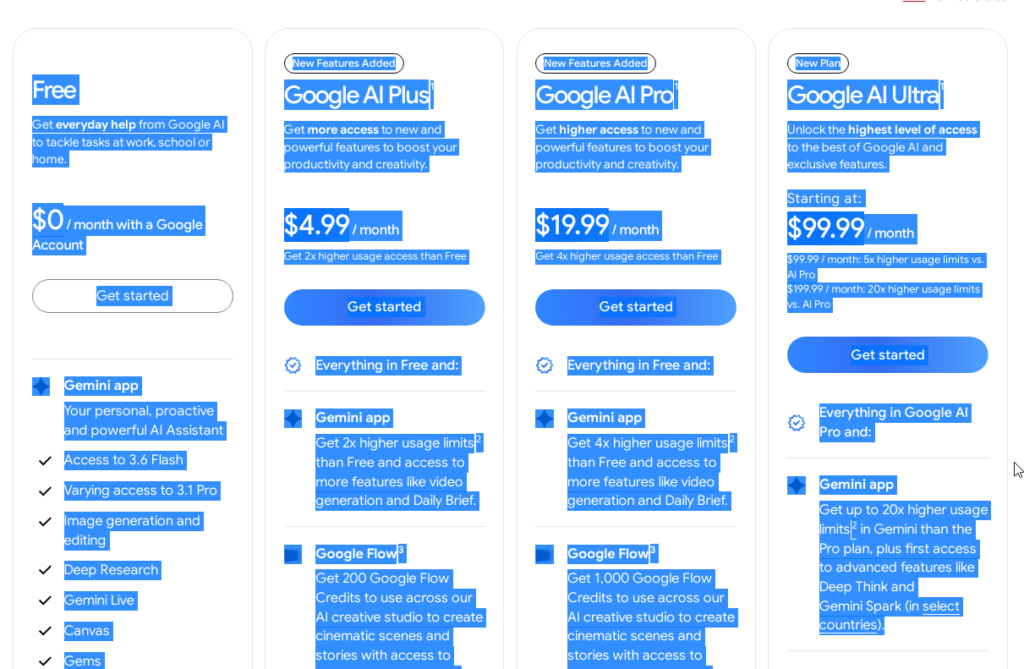
Pricing is an important factor when choosing an AI assistant. Gemini offers free access as well as paid options that can provide additional capabilities and higher usage limits.
Because Google’s AI plans and included features can change over time, users should check the current official Google pricing page before subscribing.
Is Google Gemini Free?
Yes. Google provides a free way to use Gemini, making it possible for users to try the platform without immediately paying for a subscription.
The free version can be useful for:
- Students
- Casual users
- Bloggers
- Beginners
- Freelancers
- People exploring AI tools
For everyday tasks such as brainstorming, writing assistance, general questions, and learning, free access may be enough for many users.
However, usage limits and access to advanced features can vary.
Google Gemini Free Plan
The free version provides access to Gemini’s core AI experience.
Users can use it for tasks such as:
- Asking questions
- Brainstorming
- Writing assistance
- Summarization
- Learning
- Basic coding help
- General productivity
The biggest advantage is that users can test Gemini before deciding whether they need a paid subscription.
Limitations of the Free Plan
Free access may have limitations compared with paid options.
Depending on Google’s current plans, these can include:
- Usage limits
- Limited access to advanced capabilities
- Lower availability for certain features
- Restrictions that may change over time
For occasional users, these limitations may not be a major problem.
Google Gemini Paid Plans
Google also offers paid plans for users who need higher usage limits and additional AI capabilities.
Paid plans are generally aimed at:
- Professional writers
- Developers
- Researchers
- Business users
- Content creators
- Power users
These subscriptions typically provide a more consistent experience for people who depend on AI daily.
Google Gemini Free vs Paid
The right plan depends mainly on how frequently you use AI and which features you need.
| Feature | Free Access | Paid Access |
|---|---|---|
| Basic AI conversations | Yes | Yes |
| Writing assistance | Yes | Yes |
| Brainstorming | Yes | Yes |
| General research help | Yes | Yes |
| Coding assistance | Available | Expanded access |
| Advanced capabilities | Limited | More access |
| Usage limits | More restrictive | Higher limits |
| Best for | Casual users | Frequent users |
For casual users: Start with the free version.
For heavy users: A paid plan may make sense if you regularly depend on Gemini for work, research, content creation, or other demanding tasks.
Which Google Gemini Plan Should You Choose?
Students
The free version is a good starting point for studying, summarizing notes, brainstorming, and understanding difficult subjects.
Bloggers
Bloggers can start with free access for outlines, ideas, rewriting, and research assistance. Frequent users may prefer a paid plan if they need higher limits or additional features.
Developers
Developers who use Gemini occasionally can start with free access. Those who use AI heavily for coding may benefit from additional capabilities available through paid options.
Businesses
Businesses that depend on AI for daily communication, documentation, research, and productivity may find paid access more suitable.
Is Google Gemini Worth Paying For?
A paid Gemini plan may be worth considering if you:
- Use AI every day
- Work with large projects
- Need higher usage limits
- Create content professionally
- Depend on AI for research
- Need advanced capabilities
On the other hand, the free version may be enough if you:
- Use AI occasionally
- Mainly need writing assistance
- Want help with brainstorming
- Are learning about AI
- Don’t need advanced features
The best approach is to try the free version first and upgrade only if your workflow requires more.
Google Gemini Performance: Writing, Coding, Research & Productivity
Features alone don’t tell the whole story. The real question is how useful Gemini is for everyday work.
Here is how Gemini performs across some of its most common use cases.
Google Gemini for Content Writing
Gemini can help create blog outlines, introductions, product descriptions, emails, FAQs, and other forms of written content.
What We Like
- Fast idea generation
- Good structure for drafts
- Easy rewriting
- Different writing styles
- Useful brainstorming capabilities
What Could Be Better
AI-generated writing can sometimes sound generic or repetitive. For professional content, users should review the output, add their own expertise, and fact-check important claims.
Our Rating: 4.8/5
Read: Also: Best AI Writing Tools: 15 Best AI Writers Compared (Free & Paid)
Google Gemini for Research
Gemini can help users organize information and understand complex subjects.
It can be useful for:
- Academic research
- Market research
- Study notes
- Business information
- Technical explanations
- Document summaries
One advantage is that users can ask follow-up questions and refine the response rather than starting from scratch.
However, AI-generated research should not automatically be treated as authoritative. Important facts, statistics, and claims should be verified using reliable sources.
Our Rating: 4.8/5
Google Gemini for Coding
Gemini can assist developers with programming tasks ranging from basic explanations to debugging and code generation.
It can help with:
- Code snippets
- Debugging
- Code explanations
- Programming concepts
- Documentation
- Code improvement
It can save time, especially for repetitive development tasks.
However, generated code should always be tested carefully because AI systems can produce incorrect or insecure code.
Our Rating: 4.6/5
Google Gemini for Google Workspace
For people who already rely heavily on Google’s ecosystem, this is one of Gemini’s most attractive areas.
Its integration with Google services can make it easier to work with information and documents without constantly moving between separate tools.
This is particularly useful for:
- Office workers
- Students
- Business users
- Freelancers
- Teams using Google Workspace
Our Rating: 5/5
Google Gemini for Students
Students can use Gemini as a learning and productivity assistant.
For example, it can help with:
- Explaining difficult concepts
- Summarizing study material
- Creating revision questions
- Brainstorming assignment ideas
- Organizing notes
- Understanding technical subjects
The important thing is to use AI as a learning aid rather than simply copying its answers.
Our Rating: 4.8/5
Google Gemini for Bloggers
Bloggers can use Gemini throughout the content creation process.
It can help with:
- Topic ideas
- Content outlines
- Headings
- FAQs
- Meta descriptions
- Rewriting
- Brainstorming
- Content planning
However, bloggers should not simply publish raw AI output. Adding original experience, useful examples, fact-checking, and human editing can make the content more valuable.
Our Rating: 4.8/5
Google Gemini Best Use Cases
Here are some of the practical ways users can incorporate Gemini into their daily workflow.
1. Blog Content
Gemini can help bloggers generate ideas, create outlines, rewrite paragraphs, and develop FAQs.
2. Studying
Students can use it to simplify difficult concepts, create study notes, and generate practice questions.
3. Office Productivity
Professionals can use Gemini for emails, reports, brainstorming, summaries, and other routine tasks.
4. Software Development
Developers can use it for code explanations, debugging, documentation, and learning new technologies.
5. Research and Summarization
Researchers and professionals can use Gemini to organize information and summarize documents.
Google Gemini Ease of Use
One of Gemini’s strengths is its straightforward interface.
Users who have never worked with AI tools before can generally start by simply typing a question or describing what they want.
The conversational format also makes it easy to refine an answer with follow-up prompts.
Our Rating: 4.9/5
Google Gemini Accuracy
Gemini can provide useful and well-structured answers, but it is important to remember that AI-generated information can sometimes be inaccurate, incomplete, or outdated.
For everyday brainstorming and writing, this may not be a major concern.
For topics involving:
- Finance
- Healthcare
- Law
- Important technical decisions
- Current statistics
users should verify information using trustworthy sources.
Google’s Guidance on Gemini accuracy
Our Rating: 4.5/5
Google Gemini Pros and Cons
Pros
- Strong connection with Google’s ecosystem
- Beginner-friendly interface
- Useful writing assistance
- Helpful research and summarization
- Coding assistance
- Multimodal capabilities
- Free access available
- Useful for students and professionals
Cons
- Free usage limits may affect heavy users
- AI responses can require editing
- Important information still needs fact-checking
- Some advanced capabilities may require paid access
- Not every AI task is equally strong
Google Gemini vs ChatGPT
Google Gemini and ChatGPT are two of the most popular general-purpose AI assistants, but they have different strengths.
| Feature | Google Gemini | ChatGPT |
|---|---|---|
| Writing | Excellent | Excellent |
| Coding | Very Good | Excellent |
| Research | Excellent | Excellent |
| Google ecosystem | Excellent | Limited |
| Ease of use | Excellent | Excellent |
| Free access | Yes | Yes |
| Customization | Good | Excellent |
Choose Google Gemini If:
- You use Gmail and Google Docs frequently
- Your files are organized in Google Drive
- You work heavily with Google services
- You want an AI assistant integrated into the Google ecosystem
Choose ChatGPT If:
- You want extensive customization
- You frequently work on coding projects
- You want a broad range of AI workflows
- You prefer flexible conversational assistance
Neither tool is universally better. The best option depends on your workflow.
Google Gemini vs Claude
Claude is another strong alternative to Gemini, particularly for writing and detailed explanations.
| Feature | Google Gemini | Claude |
|---|---|---|
| Writing | Excellent | Excellent |
| Long-form writing | Very Good | Excellent |
| Research | Excellent | Very Good |
| Coding | Very Good | Excellent |
| Google ecosystem | Excellent | Limited |
| Ease of use | Excellent | Excellent |
| Free access | Yes | Yes |
Choose Gemini If:
- You use Google services every day
- You want Google ecosystem integration
- You need research and document assistance
- You want an all-purpose productivity assistant
Choose Claude If:
- Long-form writing is your priority
- You work with large amounts of text
- You want detailed explanations
- Writing quality is your main concern
Read Also: Claude AI Review: Features, Pricing, Pros & Cons (Complete Guide)
Is Google Gemini Better Than ChatGPT?
Not necessarily.
Gemini may be the better choice for someone who works extensively with Google products, while ChatGPT may be more appealing to users who want broader customization and different AI workflows.
Instead of asking which tool is universally better, consider which one fits your daily tasks.
Is Google Gemini Worth Using in 2026?
Yes, Google Gemini is worth trying, especially if you already use Google services.
Its free access makes it easy to test without a financial commitment, while its broader capabilities can make it useful for professionals and frequent AI users.
The biggest reason to consider Gemini is not just its chatbot functionality but how it fits into Google’s broader ecosystem.
Frequently Asked Questions
Is Google Gemini free to use?
Yes. Google offers free access to Gemini with core AI capabilities. Additional features and higher usage limits may be available through paid options.
Is Google Gemini better than ChatGPT?
It depends on your needs. Gemini is particularly useful for people who rely on Google’s ecosystem, while ChatGPT may be a better fit for users looking for extensive customization and different AI workflows.
Can Google Gemini write blog posts?
Yes. Gemini can help create blog outlines, introductions, FAQs, product descriptions, and article drafts. However, human editing and fact-checking are recommended before publishing.
Is Google Gemini good for students?
Yes. Students can use Gemini for explanations, study notes, research organization, brainstorming, and learning difficult topics.
Can Google Gemini help developers?
Yes. Gemini can help with coding, debugging, code explanations, documentation, and programming education. Generated code should always be tested before production use.
Does Google Gemini support image analysis?
Gemini supports multimodal capabilities, including working with images and other supported content types, depending on the available features and plan.
Read Also: Best AI Image Generators: 12 Best AI Art Tools Compared (Free & Paid)
Can Google Gemini replace ChatGPT?
Not completely. Both tools have different strengths. Gemini can be especially useful for Google-focused workflows, while ChatGPT may offer advantages for certain coding, writing, customization, and general AI tasks.
Google Gemini Overall Rating
| Category | Rating |
|---|---|
| Ease of Use | 4.9/5 |
| Writing Quality | 4.8/5 |
| Research | 4.8/5 |
| Coding Assistance | 4.6/5 |
| Productivity | 4.8/5 |
| Google Integration | 5/5 |
| Value for Money | 4.8/5 |
Overall Score: 4.8/5
Conclusion
Google Gemini has grown into an AI assistant for writing, research, coding, document analysis and everyday productivity. Google Gemini’s simple interface and tight link with Google’s ecosystem make it especially helpful for people who already use Google services.
The free version lets you test Google Gemini without paying away. If you use Google Gemini a lot you might want the paid options for limits or extra features.
Google Gemini is not perfect for every task. It combines good usability, versatility and strong Google integration.
Our overall rating for Google Gemini is 4.8 out of 5.
If you need an AI assistant, for work studying, content creation, research or productivity—and especially if you already use Google services—Google Gemini is definitely worth trying in 2026.
Related Articles
Best AI Writing Tools 2026: 15 Best AI Writers Compared
Compare the top AI writing assistants for blogging, copywriting, SEO, and content creation.
Best AI Chatbots 2026: 10 Best AI Assistants Compared
Find the best AI chatbots for productivity, research, coding, and everyday tasks.
ChatGPT Review 2026: Features, Pricing, Pros & Cons
A detailed review of ChatGPT, including features, pricing, strengths, and limitations.
Claude AI Review 2026: Features, Pricing, Pros & Cons
See why Claude AI is popular for long-form writing, coding, and document analysis.

Pingback: What Is Generative AI? Definition, Examples, Benefits & Risks - AI Crest Lab