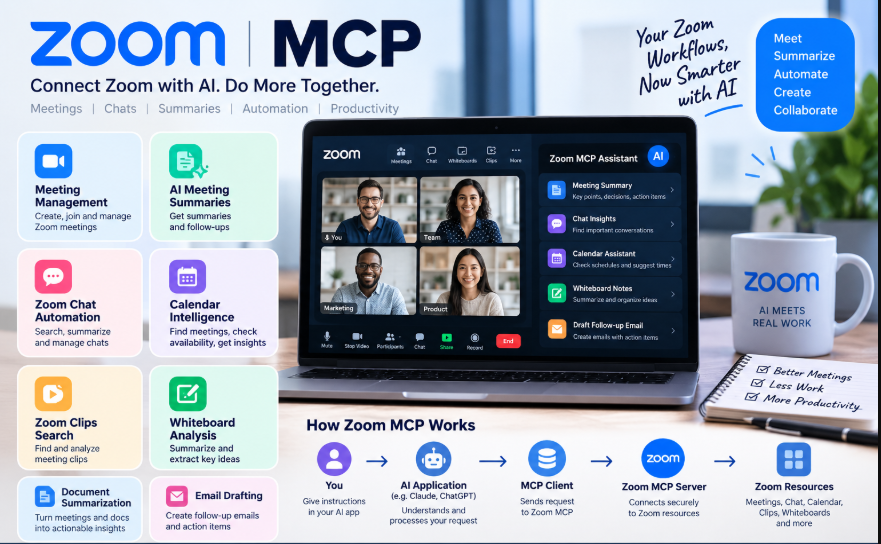
Zoom has launched an official Model Context Protocol (MCP) server that allows AI tools like Claude and ChatGPT to fetch meeting data on demand.
This type of connector grants the AI direct access to external tools, enabling you to ask questions rather than having to hunt through recordings. However, it operates only within the Zoom ecosystem and requires you to actively open an AI client and submit a query.
This article covers:
- What Zoom MCP is and what it can do.
- How to set it up and where it falls short.
- A cross-platform alternative worth knowing about.
Also Read: Best AI Meeting Assistants in 2026
TL;DR: What is Zoom MCP?
Zoom’s MCP server is an official “bridge” that enables AI clients—such as Claude, Cursor, and VS Code—to retrieve meeting data (including transcripts, recordings, and calendar details) upon request. It requires a paid Zoom plan and operates exclusively within the Zoom ecosystem.
Tactiq’s MCP server is a “cross-platform” alternative worth considering, especially if your team holds meetings on other platforms as well.
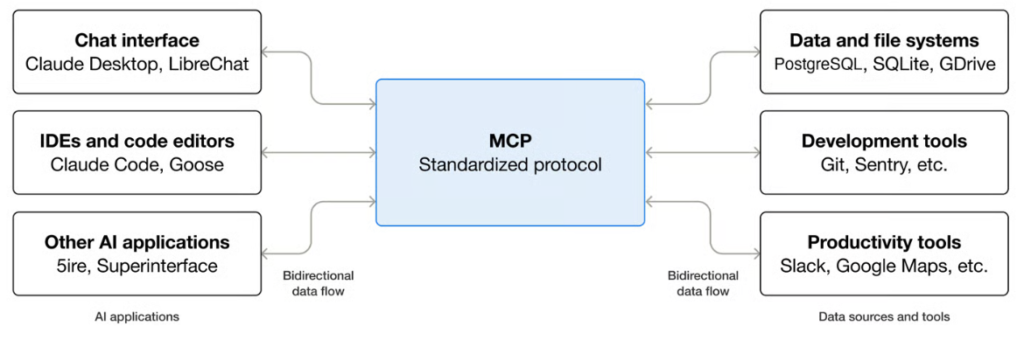
Does Zoom Have a Model Context Protocol (MCP)?
Zoom MCP vs. Zoom AI Companion vs. Zoom APIs
To avoid confusion, it is important to distinguish Zoom MCP from Zoom’s other AI and integration offerings:
| Feature / Tool | Zoom MCP Server | Zoom AI Companion | Traditional Zoom REST APIs |
| Primary Purpose | Connects third-party AI agents (Claude, ChatGPT, etc.) to Zoom resources. | In-product AI assistant embedded directly inside the Zoom client interface. | Programmatic endpoints for custom web or mobile application development. |
| Interface | Standardized MCP tool protocol. | In-meeting and in-app Zoom UI buttons. | Direct REST/HTTP requests and Webhooks. |
| Developer Effort | Minimal: Configure OAuth and point AI client to MCP endpoint. | None: Enable setting in Zoom Admin Portal. | Moderate to High: Requires custom code, request parsing, and maintenance. |
| Data Flow | External AI Client $\leftrightarrow$ Zoom MCP $\leftrightarrow$ Zoom Data. | Internal to Zoom platform. | Custom App $\leftrightarrow$ Zoom REST Endpoints. |
Zoom MCP Setup Guide
The exact setup process depends on the specific AI client being connected, but general implementation follows standard OAuth configuration:
General Setup Steps
- Access Zoom Marketplace: Log in to the Zoom App Marketplace with appropriate developer or admin permissions.
- Build an App: Select Develop > Build App and choose a General App (or Server-to-Server OAuth depending on organization requirements).
- Configure Required Scopes: Navigate to the Scopes tab and add the permissions necessary for your target workflow (e.g.,
meeting:read,cloud_recording:read:content,chat:read). - Generate Credentials: Obtain the Client ID, Client Secret, or construct an OAuth access token.
- Connect AI Client: In your chosen MCP client (such as Claude Desktop or Cursor), add the remote Zoom MCP server URL (e.g.,
[https://mcp.zoom.us/mcp/meeting/streamable](https://mcp.zoom.us/mcp/meeting/streamable)) along with the Authorization header (Bearer <YOUR_TOKEN>).
How Zoom MCP Works
Zoom MCP relies on a structured ‘request-response’ process. When a user asks an MCP-enabled AI client to perform a Zoom-related task, the following steps occur:
- User Prompt: The user submits a request in natural language to an AI client that supports MCP (e.g., “Get the transcript for my 10 AM meeting and list all pending decisions.”).
- Tool Selection: The AI client identifies that the Zoom MCP server provides a tool capable of retrieving transcripts (e.g.,
get_transcriptor meeting search). - MCP Call: The client sends an authenticated MCP request, containing specific parameter keys, to Zoom’s remote MCP endpoint.
- Data Retrieval: The Zoom MCP server verifies the user’s OAuth scopes and permissions, retrieves the requested data from Zoom’s infrastructure, and sends back a response.
- Response Synthesis: The AI client processes the retrieved raw text or transcript, compiles the response, and presents it to the user with clean formatting.
Zoom MCP Limitations
While Zoom MCP offers significant benefits for AI integration, organizations should consider the following limitations:
- Account and Admin Permissions: Setup requires access to the Zoom App Marketplace, and IT admin approval may be necessary depending on account policies.
- License Requirements: Specific endpoints (such as Revenue Accelerator or certain search capabilities) require specific Zoom product licenses or plan tiers.
- Rate Limits: API calls are subject to daily rate limits based on the account tier (e.g., Pro, Business, Enterprise).
- Interaction Model: MCP operates on a stateless request-response model. It activates only when an AI client initiates a tool call; it does not automatically push real-time alerts or event hooks to AI clients.
- Zoom-Specific Scope: Zoom MCP indexes data within the Zoom ecosystem. It does not aggregate data from competing platforms like Microsoft Teams or Google Meet unless wrapped in a multi-platform bridge.
- Evolving Specifications: As MCP specifications evolve (such as the 2026 stateless HTTP updates), configuration steps and transport headers may require ongoing maintenance.
Who might not need Zoom MCP?
- Casual Zoom users: Individuals who only require standard video conferencing and manual cloud recording.
- Zoom AI Companion users: Teams already satisfied with Zoom AI Companion’s built-in, in-app meeting summaries.
- Non-AI workflows: Developers building static dashboards, administrative billing tools, or standard Webhook integrations where REST APIs are more suitable.
- Pros and Cons
Pros
- Standardized integration: Plugs directly into any MCP-compliant AI assistant without custom “glue code.”
- Comprehensive workspace access: Covers meetings, transcripts, chat, documents, whiteboards, and tasks.
- Reduced portal friction: Allows natural language queries to replace manual web portal browsing.
- Granular OAuth control: Secured via standard OAuth permission scopes.
Cons
- Initial setup effort: Requires registering an app in the Zoom App Marketplace and managing OAuth tokens.
- Zoom data boundary: Queries are exclusive to Zoom assets; does not natively integrate third-party meeting tools.
- Reactive nature: Activates only when explicitly requested by the user via an AI prompt.
- Rate limits: Subject to tier-specific daily request quotas.
Conclusion
Zoom MCP introduces standardized AI interoperability to Zoom’s collaboration suite. By using the Model Context Protocol Zoom allows third party AI assistants like Claude and ChatGPT to access meeting transcripts search chat histories pull out action items and work with documents, without interruption.
Before using Zoom MCP check your organizations Zoom account tier. Make sure the correct OAuth scopes are set up. Also confirm that data privacy rules are followed if you’re working with any meeting information.
Frequently Asked Questions (FAQ)
What is Zoom MCP?
Zoom MCP is an official server implementation of the Model Context Protocol (MCP) that enables AI assistants to securely read and interact with Zoom meetings, transcripts, recordings, chats, and workspace documents.
Is Zoom MCP free?
Zoom MCP server endpoints are accessible as part of Zoom’s developer platform. However, usage depends on your underlying Zoom account tier, and certain features (such as Revenue Accelerator tools) require paid product add-ons or specific plan subscriptions.
What can Zoom MCP do?
Zoom MCP allows AI clients to search past meetings, retrieve verbatim transcripts, extract action items, read team chat channels, create Zoom Docs, and generate editable whiteboard diagrams using natural language commands.
Which AI clients support Zoom MCP?
Any client compatible with the Model Context Protocol standard can connect to Zoom MCP, including Claude Desktop, Claude Code, Cursor, and ChatGPT (via MCP connectors).
Is Zoom MCP secure?
Yes, Zoom MCP uses standard OAuth authentication and scope-based permissions. An AI client can only access data permitted by the authenticated user’s account and the assigned scopes.
Does Zoom MCP require a developer account?
Establishing a Zoom MCP connection requires access to create a General or OAuth app in the Zoom App Marketplace, which typically necessitates developer or admin privileges on the Zoom account.
What is the difference between Zoom MCP and the Zoom API?
Zoom REST APIs are designed for software developers writing custom code or applications. Zoom MCP is a standard protocol designed specifically for AI agents to dynamically query Zoom resources without requiring custom integration code for each AI client.