
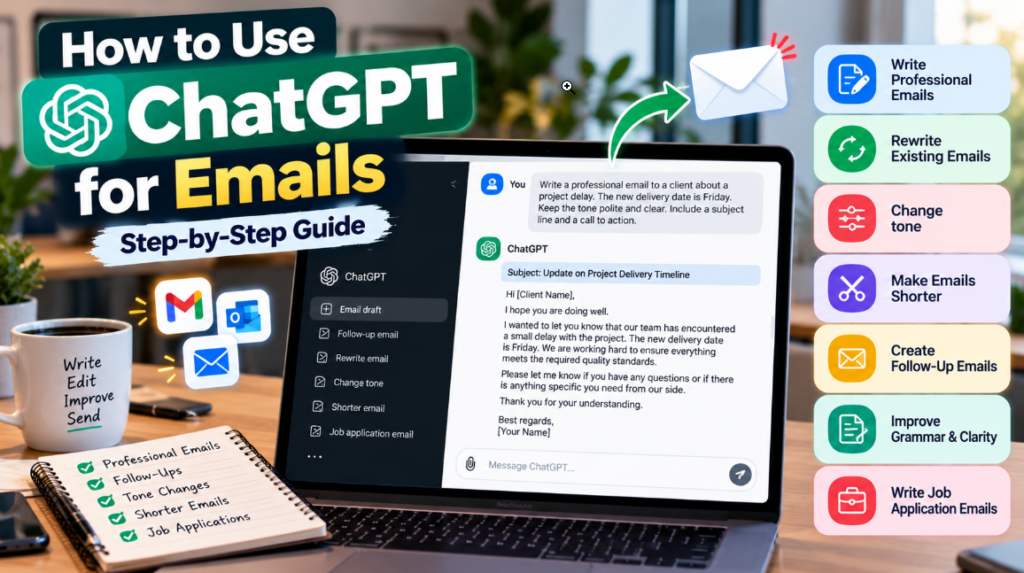
Writing an professional email can take more time than you think. Whether you are reaching out to a professor responding to a client updating your manager following up on a job application or replying to a customer finding the right words is not always simple.
ChatGPT can help with parts of the email writing process. You can use it to create a draft rewrite an existing message, fix grammar adjust the tone make a long email shorter or turn rough notes into a clear message.
However ChatGPT should be seen as a writing assistant and not as a replacement, for your thinking. Always check the email to make sure the facts, tone, names, dates and what you mean to say are all correct before you send it.
Also Read: ChatGPT Review 2026: Features, Pricing, Pros & Cons (Complete Guide)
Table of Contents
Can ChatGPT Write Emails?
Yes. ChatGPT can help you create and improve emails when you provide enough context and clear instructions.
For example, you can ask ChatGPT to:
- Draft a new email from a few bullet points
- Rewrite an existing email
- Make an email more professional
- Make a long email shorter
- Change the tone from formal to friendly
- Improve grammar and clarity
- Write a follow-up email
- Turn rough notes into a structured message
- Suggest subject lines
The quality of the result depends partly on the information and instructions you provide. If the context is unclear, ChatGPT may misunderstand your intention, use the wrong tone, or introduce information that was not provided.
For this reason, human review is an important final step when using ChatGPT for email writing.
What You Need Before Using ChatGPT for Emails
You do not need a complicated setup to start using ChatGPT for emails. The most important thing is to provide enough context.
Before writing your prompt, consider these details:
1. Who Is the Recipient?
Tell ChatGPT who will receive the email.
For example:
- Manager
- Client
- Customer
- Professor
- Colleague
- Hiring manager
- Business partner
2. What Is the Purpose?
Explain what you want the email to accomplish.
For example:
- Request information
- Ask for approval
- Schedule a meeting
- Follow up on a previous message
- Submit an application
- Explain a delay
- Respond to a complaint
3. What Information Must Be Included?
Provide the important facts, dates, numbers, names, or instructions that should appear in the email.
4. What Tone Do You Want?
You can specify a tone such as:
- Professional
- Formal
- Friendly
- Polite
- Direct
- Diplomatic
- Concise
5. How Long Should the Email Be?
If you want a short email, tell ChatGPT. For example:
Keep the email under 120 words.
You can also ask for a detailed version if the situation requires more explanation.
6. What Information Must Not Change?
If you are rewriting an existing email, tell ChatGPT to preserve the original facts and meaning.
How to Use ChatGPT for Emails
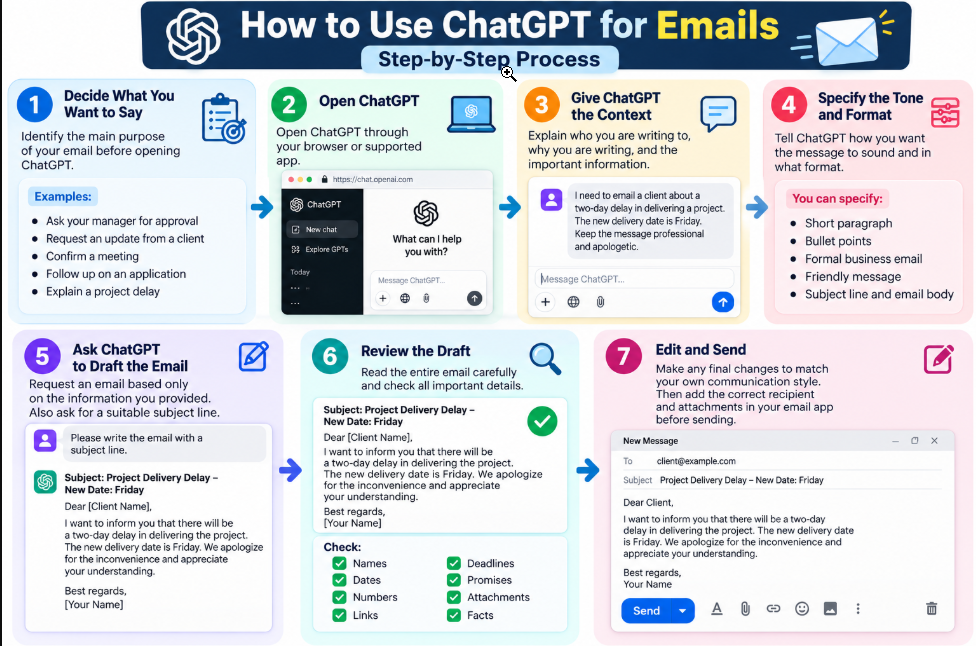
Once you have the necessary information, you can follow a simple process.
Step 1: Decide What You Want to Say
Before opening ChatGPT, identify the main purpose of your email.
For example, you may want to:
- Ask your manager for approval
- Request an update from a client
- Confirm a meeting
- Follow up on an application
- Explain a project delay
Having a clear goal makes it easier to write an effective prompt.
Step 2: Open ChatGPT
Open ChatGPT through your browser or supported app.
Step 3: Give ChatGPT the Context
Explain who you are writing to, why you are writing, and the important information that needs to be included.
For example:
I need to send an email to a client about a two-day delay, in delivering a project. The new delivery date is Friday. I need to make sure the message is professional and shows apology.
Step 4: Specify the Tone and Format
Tell ChatGPT how you want the message to sound.
You can also specify whether you want:
- A short paragraph
- Bullet points
- A formal business email
- A friendly message
- A subject line and email body
Step 5: Ask ChatGPT to Draft the Email
Ask ChatGPT to create the email based only on the information you provided.
It is also useful to request a suitable subject line.
Step 6: Review the Draft
Read the entire email carefully.
Check:
- Names
- Dates
- Numbers
- Links
- Deadlines
- Promises
- Attachments
- Facts
Step 7: Edit and Send
Make any final changes needed to match your own communication style.
Then add the correct recipient and attachments in your email application before sending the message.
Best ChatGPT Prompt for Writing an Email
A good prompt gives ChatGPT enough context without making the instructions unnecessarily complicated.
You can copy and customize this prompt:
Write a professional email to [recipient/name] about [topic or purpose]. The main points I need to communicate are [point 1], [point 2], and [point 3]. Keep the email clear, polite, and concise. Include a suitable subject line and a clear call to action. Do not add facts, dates, names, or assumptions that I did not provide.
How to Customize the Prompt
Replace the information inside the brackets with your own details.
For example, if you are contacting a client about a delayed report, provide the actual reason and the new delivery date instead of asking ChatGPT to invent them.
This helps keep the resulting email closer to the information you actually want to communicate.
How to Write a Professional Email With ChatGPT
You can also use ChatGPT when you know what you want to say but your notes are unorganized.
Example Input
Suppose your rough notes are:
- Ask design team for project update
- Need status of homepage mockups
- Deadline is Friday at 3 PM
- Keep tone polite
You could ask ChatGPT to turn these notes into a professional email.
Example Output
Subject: Status Update: Homepage Mockups
Hi Team,
Could you please provide a brief update on the progress of the homepage mockups?
Our target deadline for receiving the designs is Friday at 3:00 PM. Please let me know if there are any issues that could affect the timeline or if you need any additional information from me.
Thank you for your work.
Best regards,
[Your Name]
The example above is fictional and can be adapted to your actual situation.
How to Use ChatGPT to Rewrite an Existing Email
You do not always need ChatGPT to write an email from scratch. It can also help improve a message you have already written.
For example, you can ask it to improve:
- Grammar
- Clarity
- Structure
- Professional tone
- Conciseness
- Awkward wording
Copy-and-Paste Prompt
Rewrite the following email so it sounds clear, professional, and polite. Preserve the original facts and meaning. Do not add new information or unnecessary wording.
[Paste your email here]
This approach is particularly useful when you already know what you want to say but are not happy with the wording.
How to Make an Email Shorter With ChatGPT
Long emails can sometimes make important information difficult to find.
ChatGPT can help reduce unnecessary wording while keeping the main message intact.
Prompt
Shorten the following email while keeping all important names, dates, facts, and action items. Remove repetition and unnecessary wording. Keep the final version clear and professional and under 100 words.
[Paste email here]
After receiving the shorter version, compare it with the original to make sure no important information was removed.
How to Change the Tone of an Email
The same information can sometimes be communicated in different ways depending on the recipient and situation.
You can ask ChatGPT to rewrite an email as:
- Formal
- Friendly
- Professional
- Warm
- Direct
- Diplomatic
Example
Suppose you need to remind a colleague about a late report.
Formal and direct:
Subject: Quarterly Report Submission
Dear Mark,
The quarterly report was due yesterday. Please submit the completed report by 2:00 PM today so that we can remain on schedule.
Thank you for your prompt attention.
Friendly and professional:
Subject: Quick Follow-Up on the Quarterly Report
Hi Mark,
Just following up on the quarterly report. If you could send it over by 2:00 PM today, that would help us stay on schedule. Please let me know if you need any help.
Thanks!
Both examples communicate a similar message, but the tone is different.
How to Write a Follow-Up Email With ChatGPT
Follow-up emails are common in business, hiring, sales, customer service, and project management.
You can use ChatGPT to create a polite follow-up without making the message unnecessarily long.
Prompt
Write a short and polite follow-up email to [recipient] regarding [topic or previous email]. Mention that I previously contacted them on [date], ask whether they have an update, and keep the tone professional and non-pushy. Keep it under 100 words.
You can use this type of prompt for:
- Job applications
- Interviews
- Business proposals
- Customer inquiries
- Vendor requests
- Internal project updates
Also Read: How to Use ChatGPT for Meeting Notes
How to Reply to a Difficult or Sensitive Email
Some emails require extra care, particularly when they involve complaints, disagreements, delays, or misunderstandings.
ChatGPT can help you create a calmer draft before you send a response.
Prompt
Help me draft a calm and professional response to a client who is unhappy about [issue]. Acknowledge their concern and explain that we are addressing the issue by [actual action]. Keep the response respectful and avoid defensive language. Do not make promises that I have not provided.
Always review this type of response carefully.
Make sure any commitments, refunds, deadlines, explanations, or promises in the final email are accurate and consistent with your actual situation or company policy.
How to Write a Job Application Email With ChatGPT
ChatGPT can also help structure a concise job application email.
Prompt
Write a professional job application email for the position of [Job Title] at [Company Name]. Mention that I have [X] years of experience in [field] and highlight my experience in [specific skill or achievement]. Mention that my resume is attached. Keep the email concise and professional. Do not add qualifications or experience that I did not provide.
Basic Structure
A job application email can include:
- Subject line: Position and applicant name
- Greeting: Hiring manager or appropriate team
- Opening: Position you are applying for
- Relevant background: Key experience or skills
- Attachment: Resume or portfolio
- Closing: Professional sign-off
ChatGPT can help organize this information, but it cannot guarantee an interview or job offer.
Practical Email Examples
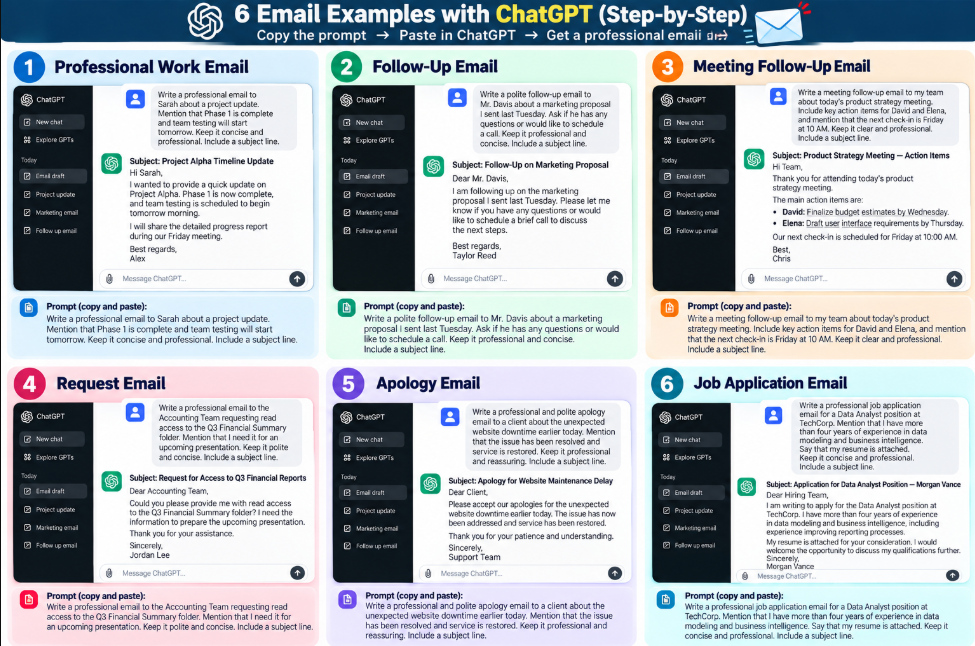
Here are a few fictional examples of how ChatGPT can help with common email situations.
Example 1: Professional Work Email
Subject: Project Alpha Timeline Update
Hi Sarah,
I wanted to provide a quick update on Project Alpha. Phase 1 is now complete, and team testing is scheduled to begin tomorrow morning.
I will share the detailed progress report during our Friday meeting.
Best regards,
Alex
Example 2: Follow-Up Email
Subject: Follow-Up on Marketing Proposal
Dear Mr. Davis,
I am following up on the marketing proposal I sent last Tuesday. Please let me know if you have any questions or would like to schedule a brief call to discuss the next steps.
Best regards,
Taylor Reed
Example 3: Meeting Follow-Up Email
Subject: Product Strategy Meeting — Action Items
Hi Team,
Thank you for attending today’s product strategy meeting.
The main action items are:
- David: Finalize budget estimates by Wednesday.
- Elena: Draft the user interface requirements by Thursday.
Our next check-in is scheduled for Friday at 10:00 AM.
Best,
Chris
Example 4: Request Email
Subject: Request for Access to Q3 Financial Reports
Dear Accounting Team,
Could you please provide me with read access to the Q3 Financial Summary folder? I need the information to prepare the upcoming presentation.
Thank you for your assistance.
Sincerely,
Jordan Lee
Example 5: Apology Email
Subject: Apology for Website Maintenance Delay
Dear Client,
Please accept our apologies for the unexpected website downtime earlier today. The issue has now been addressed and service has been restored.
Thank you for your patience and understanding.
Sincerely,
Support Team
Example 6: Job Application Email
Subject: Application for Data Analyst Position — Morgan Vance
Dear Hiring Team,
I am writing to apply for the Data Analyst position at TechCorp. I have more than four years of experience in data modeling and business intelligence, including experience improving reporting processes.
My resume is attached for your consideration. I would welcome the opportunity to discuss my qualifications further.
Sincerely,
Morgan Vance
Tips for Getting Better Email Results From ChatGPT
A few simple prompting techniques can make your results more useful.
Be Specific About Length
Instead of saying “make it short,” try:
Keep the email under 120 words.
Define the Audience
Tell ChatGPT whether the reader is a manager, customer, colleague, professor, or hiring manager.
Tell It Not to Invent Information
Use instructions such as:
Do not invent names, dates, numbers, or facts.
Ask for Multiple Subject Lines
If you are unsure about the subject, ask:
Give me three professional subject-line options.
Improve the Draft Instead of Starting Again
If the first version is close but not quite right, give ChatGPT a specific instruction:
Keep the current email but make the tone warmer and reduce the length by 20%.
This can be more useful than starting the entire process again.
Privacy and Sensitive Information
Be careful when using AI tools to process emails, especially when the content contains confidential information.
Avoid entering information such as:
- Passwords or account credentials
- Banking or payment details
- Sensitive customer information
- Confidential business plans
- Private employee information
- Legal or medical information
If you are using ChatGPT for work-related emails, follow your organization’s policies regarding AI tools and confidential information.
Before using sensitive information with an AI service, review the current privacy and data-control options available to you.
Limitations of Using ChatGPT for Emails
ChatGPT can help with email writing, but it can still make mistakes.
It May Miss Context
ChatGPT does not automatically know your relationship with the recipient or the background of a situation. You need to provide relevant context.
The Wording Can Sound Generic
An AI-generated email may sometimes use phrases that sound too formal, repetitive, or unlike your normal writing style.
The Tone May Not Be Right
A message intended to sound friendly could come across as too formal or too casual if the prompt does not provide enough context.
It Can Introduce Incorrect Information
If your instructions are unclear, an AI system may produce information that was not intended or supported by your input.
For these reasons, always review the final email before sending it.
ChatGPT for Emails: Final Review Checklist
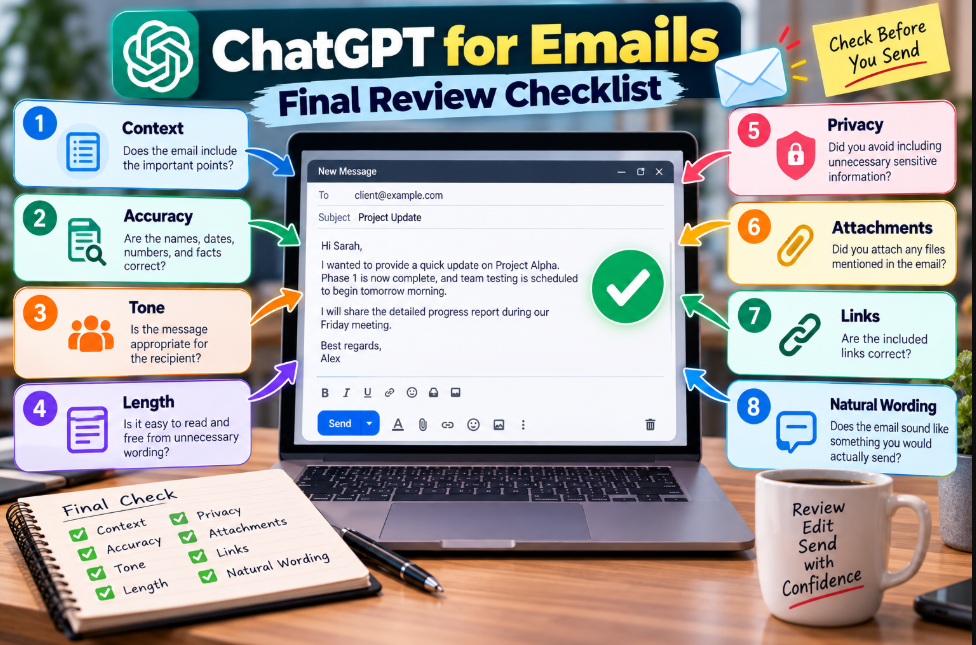
Before sending an AI-assisted email, quickly check the following:
- Context: Does the email include the important points?
- Accuracy: Are the names, dates, numbers, and facts correct?
- Tone: Is the message appropriate for the recipient?
- Length: Is it easy to read and free from unnecessary wording?
- Privacy: Did you avoid including unnecessary sensitive information?
- Attachments: Did you attach any files mentioned in the email?
- Links: Are the included links correct?
- Natural wording: Does the email sound like something you would actually send?
Also Read: Best AI Productivity Tools
Conclusion
Using ChatGPT for emails can make everyday communication easier. It helps you create drafts rewrite messages you already wrote, fix grammar change how the tone sounds, shorten emails and even prepare follow-up messages.
The best results come when you give ChatGPT context, specific instructions and all the details that must be in the email. Also tell it not to make up facts if it doesn’t have them.
Still AI-generated emails need a human to check them before sending. Look over the message for accuracy, tone, privacy and whether it says what you meant.
Used this way ChatGPT can be an AI email writing assistant. But you stay in charge. You’re responsible, for the message.
Frequently Asked Questions
Can ChatGPT write emails for me?
Yes. ChatGPT can create an email from the information and instructions you provide. You should review the draft before sending it.
What is the best ChatGPT prompt for writing emails?
A useful prompt should include the recipient, purpose, key information, desired tone, and preferred length. It should also tell ChatGPT not to invent information that you did not provide.
Can ChatGPT make an email more professional?
Yes. You can provide an existing draft and ask ChatGPT to improve its grammar, structure, clarity, and professional tone while preserving the original meaning.
Can ChatGPT rewrite an email without changing its meaning?
Yes. Tell ChatGPT to preserve the original facts and meaning while improving clarity and wording. You should still compare the rewritten version with the original before sending it.
Can ChatGPT write follow-up emails?
Yes. You can use ChatGPT to draft follow-up emails for job applications, meetings, proposals, customer inquiries, and other situations.
Can ChatGPT help me reply to a difficult email?
Yes. You can ask ChatGPT to create a calm, professional response to a complaint or disagreement. Review the result carefully before sending it, particularly if the message involves commitments or sensitive issues.
Can ChatGPT write a job application email?
Yes. ChatGPT can help structure a job application email using your actual experience, skills, and the position details you provide.
Is it safe to use ChatGPT for work emails?
The answer depends on the information involved and your organization’s policies. Avoid entering confidential or sensitive information unless you are authorized to use the relevant AI service for that purpose and understand the applicable privacy controls.
Should I check a ChatGPT-generated email before sending it?
Yes. Always review an AI-generated email for accuracy, context, tone, names, dates, attachments, links, and any commitments before sending it.